
Introduction
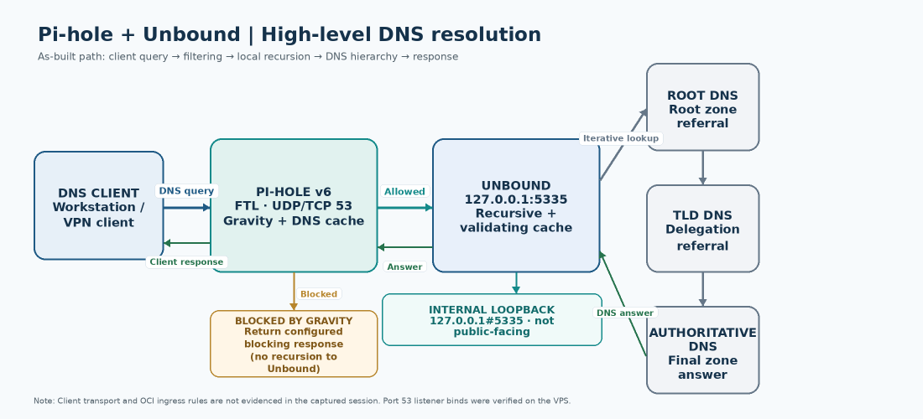
DNS is one of the most fundamental components of internet infrastructure. Almost every connection we make starts with a DNS query: opening a website, connecting to an application, or communicating with an external service.
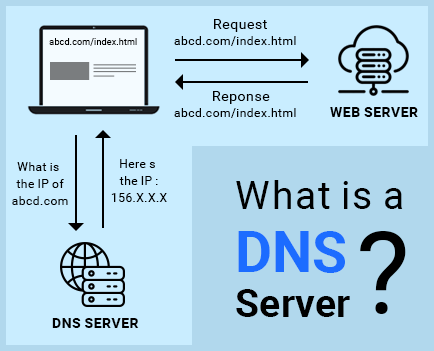
Most users rely on public DNS resolvers such as Google Public DNS or Cloudflare DNS. They are convenient, reliable, and easy to configure. However, relying entirely on third-party DNS resolvers means handing over an important part of network resolution to an external provider.
I wanted something different: a self-hosted DNS infrastructure that could provide domain filtering, recursive DNS resolution, and DNSSEC validation under my own control.
For this project, I used two open-source technologies:
- Pi-hole – DNS-level filtering for advertisements, trackers, and unwanted domains.
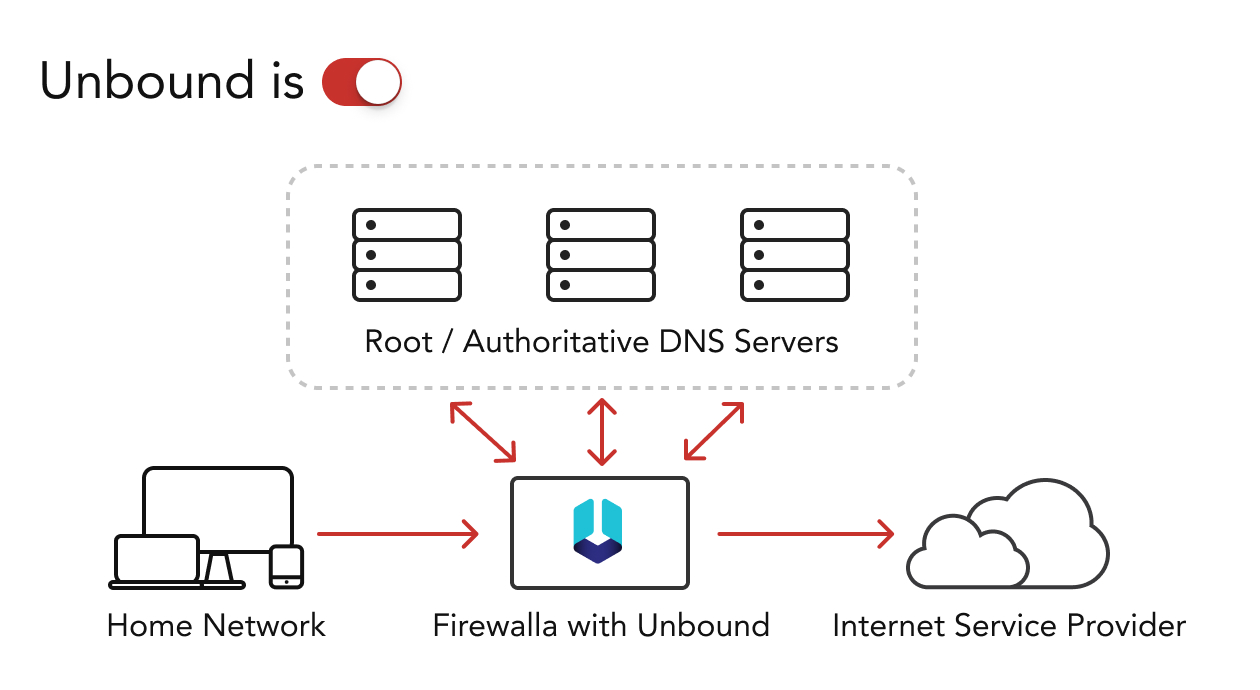
- Unbound – A recursive DNS resolver that performs DNS resolution through the DNS hierarchy.
The entire infrastructure runs on an Ubuntu ARM64 VPS hosted on Oracle Cloud Infrastructure (OCI), in the Indonesia region.
The result is a self-hosted DNS architecture combining filtering and recursive resolution without relying on a conventional public DNS resolver as its upstream.
1. Infrastructure Overview
The deployment uses the following environment:
| Component | Configuration |
|---|---|
| Cloud Provider | Oracle Cloud Infrastructure |
| Region | Indonesia (Batam) |
| Operating System | Ubuntu Server 24.04 LTS |
| Architecture | ARM64 / AArch64 |
| DNS Filtering | Pi-hole v6 |
| Recursive Resolver | Unbound |
| Service Manager | systemd |
| DNS Testing | dig |
| Pi-hole DNS Port | 53 |
| Unbound DNS Port | 5335 |
The decision to use port 5335 for Unbound was intentional.
Pi-hole already provides DNS service on port 53. Running Unbound on the same port and interface would create a port conflict.
Instead, both services communicate through the local loopback interface.
2. Understanding the Architecture
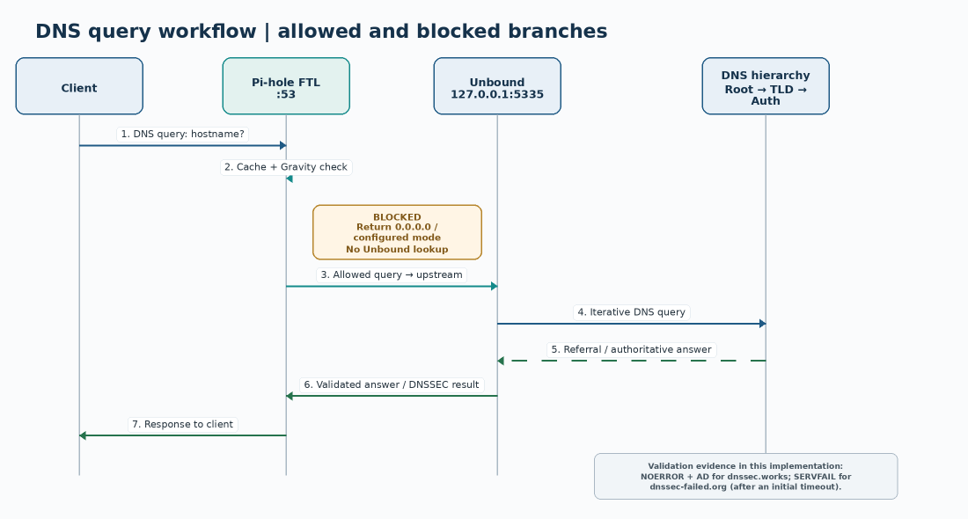
Before installing anything, it is important to understand the difference between DNS forwarding and recursive DNS resolution.
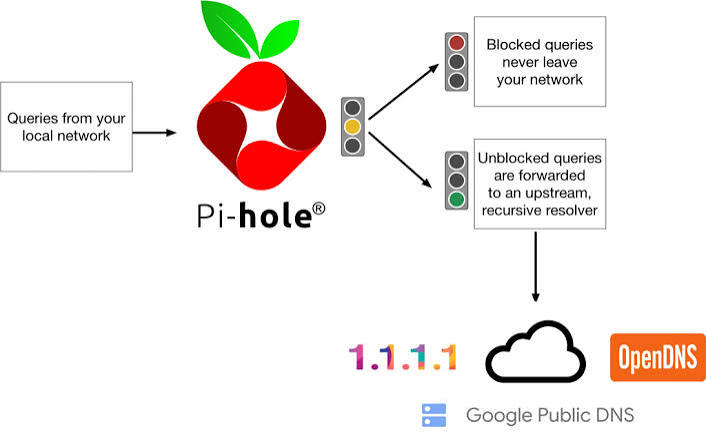
A traditional DNS forwarding configuration looks like this:
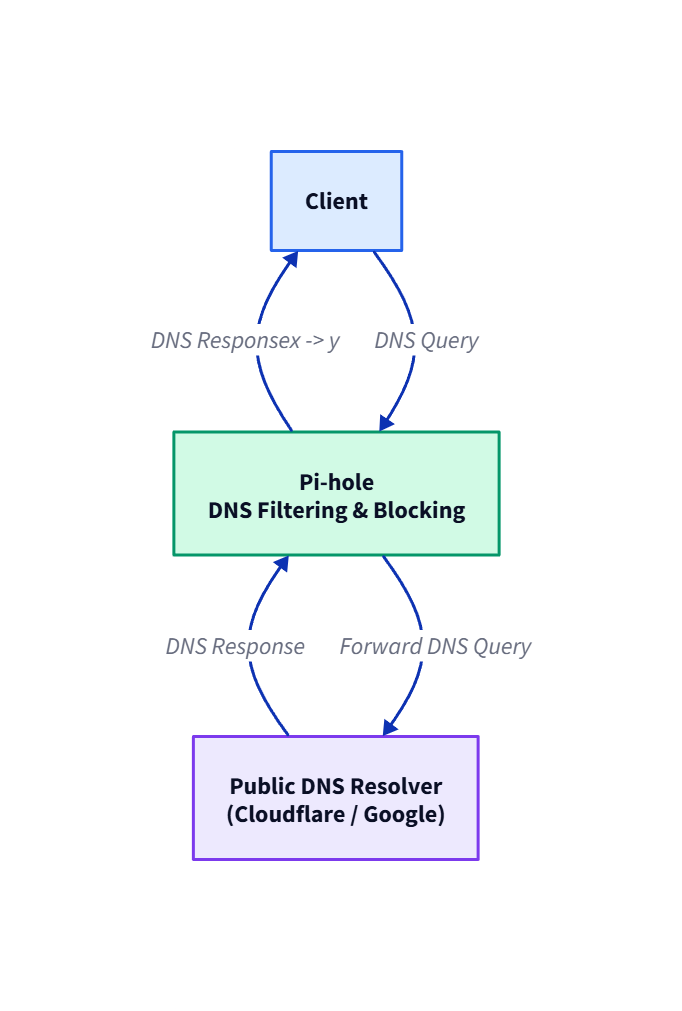
With this architecture, Pi-hole forwards permitted DNS queries to an external resolver such as Cloudflare or Google.
The architecture I implemented is different:
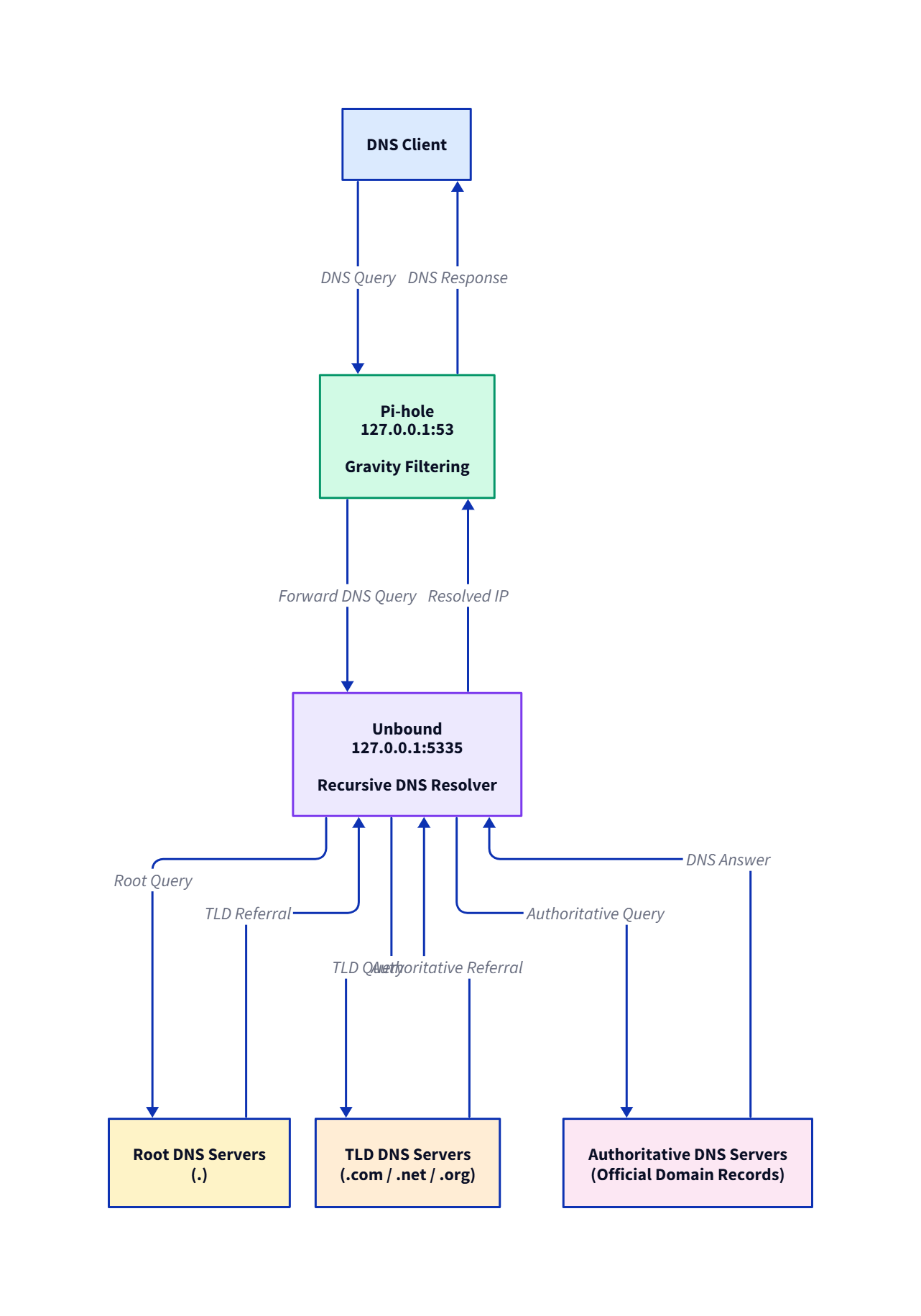
Unbound performs recursive resolution by following DNS referrals from root servers to TLD servers and eventually to authoritative name servers.
This allows the resolver to obtain DNS information without depending on a conventional public recursive DNS provider.
It is important to understand that recursive resolution does not mean complete anonymity. Authoritative DNS operators and network providers may still observe relevant DNS traffic.
3. Installing Unbound on Ubuntu ARM64
The first step was installing Unbound and its supporting DNS utilities.
sudo apt update
sudo apt install unbound dns-root-data dnsutils -y
The installation completed successfully on the ARM64 VPS.
The installed Unbound package was:
unbound 1.19.2-1ubuntu3.12The installation also included supporting libraries and created the systemd service.
One interesting detail during installation was this message:
Could not execute systemctl:
at /usr/bin/deb-systemd-invoke
This appeared during package configuration, but the service was subsequently enabled and started successfully through systemd.
4. Configuring Unbound
I created a dedicated configuration file:
sudo nano /etc/unbound/unbound.conf.d/pi-hole.confThe configuration used for this deployment was:
server:
    verbosity: 0

    interface: 127.0.0.1
    port: 5335

    do-ip4: yes
    do-ip6: yes
    prefer-ip6: no
    do-udp: yes
    do-tcp: yes

    harden-glue: yes
    harden-dnssec-stripped: yes
    qname-minimisation: yes

    edns-buffer-size: 1232
    prefetch: yes

    hide-identity: yes
    hide-version: yes

    private-address: 10.0.0.0/8
    private-address: 172.16.0.0/12
    private-address: 192.168.0.0/16
    private-address: 169.254.0.0/16
    private-address: fd00::/8
    private-address: fe80::/10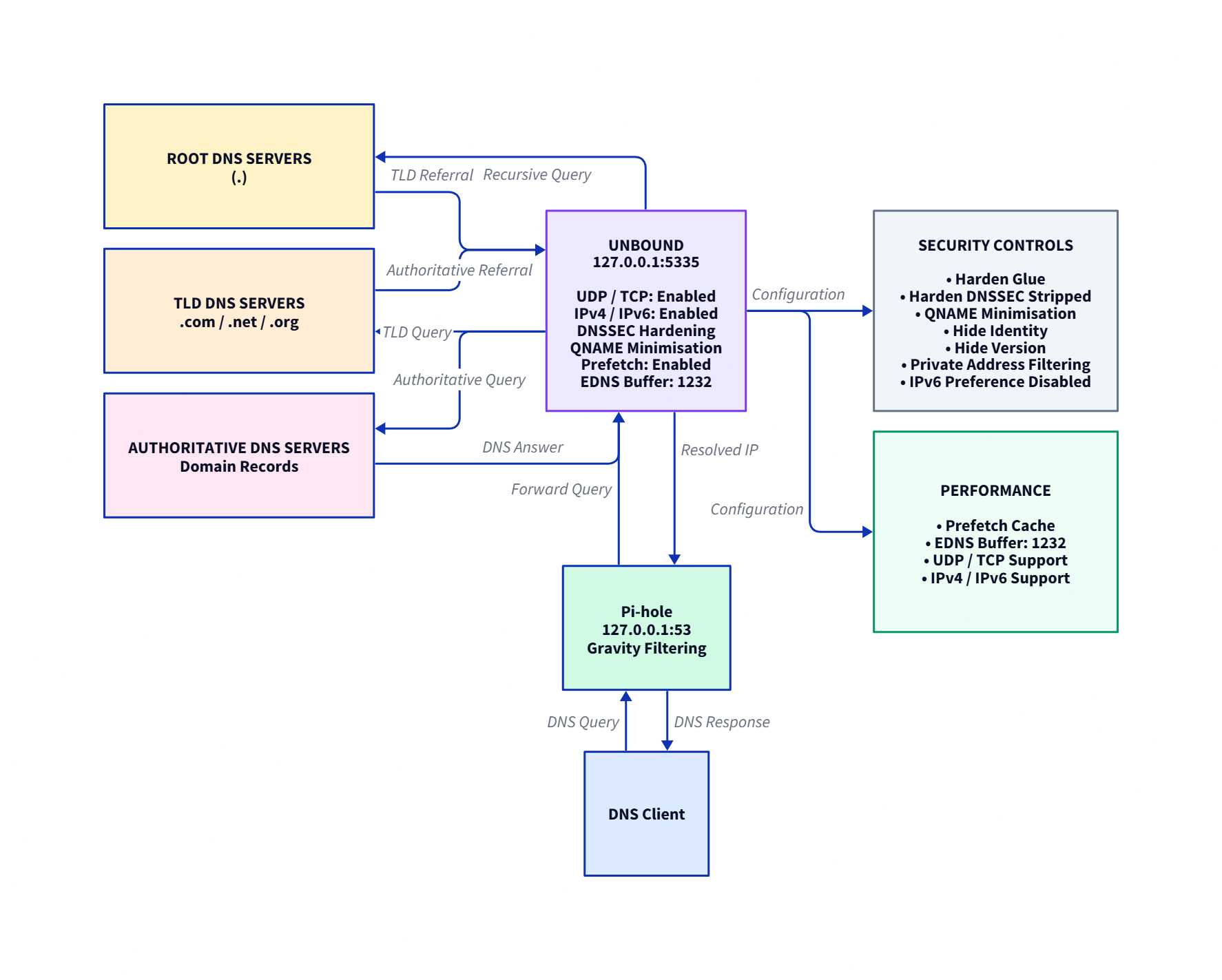
A few parameters deserve special attention.
Localhost Binding
interface: 127.0.0.1
port: 5335
Unbound only listens on the IPv4 loopback interface.
This is important because Unbound is intended to communicate with Pi-hole locally, not serve public DNS queries directly.
There is no reason to expose port 5335 to the public internet in this architecture.
DNSSEC Hardening
harden-glue: yes
harden-dnssec-stripped: yes
These settings provide additional protections during DNS resolution.
DNSSEC helps validate the authenticity and integrity of DNS data through cryptographic signatures.
QNAME Minimisation
qname-minimisation: yesQNAME minimisation reduces the amount of query-name information disclosed to intermediate DNS servers during iterative resolution.
Cache Prefetch
prefetch: yesUnbound can refresh frequently requested records before their cache entries expire.
This can help improve response times for frequently accessed domains.
Private Address Filtering
The private-address parameters prevent certain private or local address ranges from being accepted in DNS answers.
This is useful as an additional DNS rebinding protection measure, although it should be reviewed if the infrastructure needs to resolve internal domains to private addresses.
5. Validating and Starting Unbound
Before starting the service, I validated the configuration.
sudo unbound-checkconfThe result:
unbound-checkconf:
no errors in /etc/unbound/unbound.conf
Then I enabled and started Unbound:
sudo systemctl enable --now unbound
sudo systemctl restart unbound
The service was confirmed running:
unbound.service - Unbound DNS server

Loaded: loaded
Active: active (running)

Main PID: 2148710 (unbound)
Memory: 8.7M
At this point, Unbound was running independently. The next step was testing its recursive DNS functionality.
6. Testing Recursive DNS Resolution
I tested Unbound directly using dig.
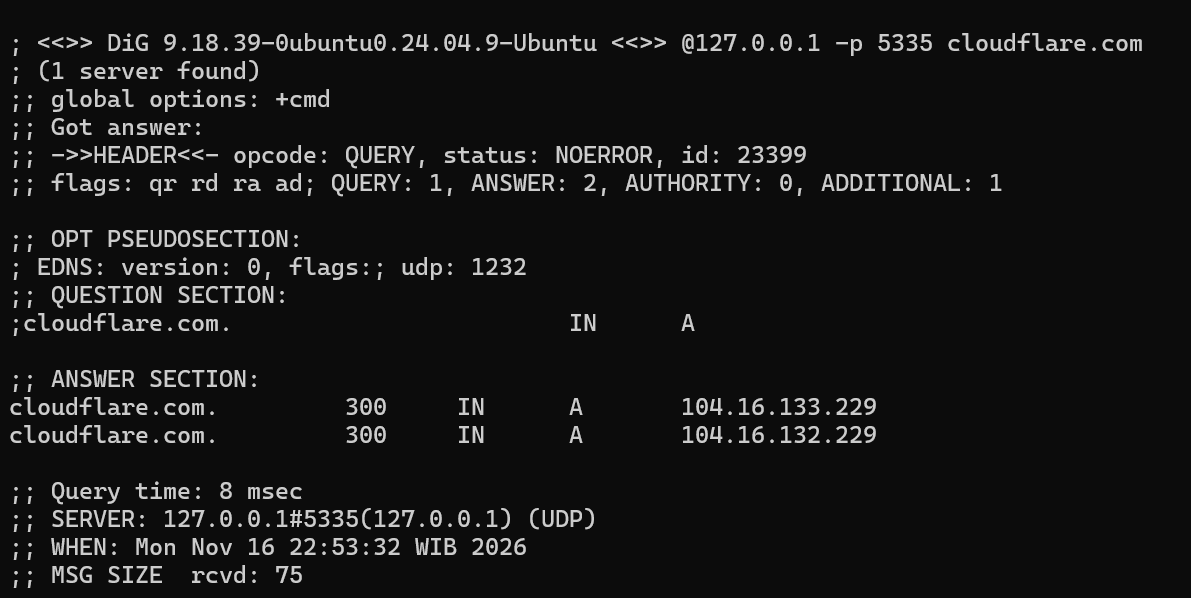
dig @127.0.0.1 -p 5335 cloudflare.comThe response returned:
status: NOERROR
flags: qr rd ra ad

SERVER: 127.0.0.1#5335
Query time: 530 msec
The important detail is the ad flag.
This indicates that the returned DNS data was authenticated through DNSSEC validation.
I also tested the resolver multiple times:
for i in {1..5}; do
  dig @127.0.0.1 -p 5335 google.com \
    +short +time=5 +tries=1
done
All five iterations returned Google IP addresses.
This confirmed that Unbound was consistently resolving DNS queries during that test.
7. Integrating Unbound with Pi-hole v6
With Unbound operational, I moved to the integration phase.
Pi-hole v6 provides configuration through the pihole-FTL command.
I configured the upstream resolver with:
sudo pihole-FTL --config dns.upstreams \
'[ "127.0.0.1#5335" ]'
The resulting configuration was verified:
pihole-FTL --config dns.upstreamsOutput:
[ 127.0.0.1#5335 ]This confirms that Pi-hole uses Unbound as its configured upstream resolver.
The resulting query flow is:
- A client sends a DNS query to Pi-hole.
- Pi-hole checks its Gravity database.
- Blocked domains receive a blocking response.
- Allowed queries are forwarded to Unbound.
- Unbound performs recursive DNS resolution.
- The result returns to Pi-hole.
- Pi-hole responds to the client.
This separation of responsibilities is the main advantage of the architecture.
Pi-hole handles policy and filtering, while Unbound handles recursive DNS resolution and DNSSEC validation.
8. Troubleshooting: Pi-hole FTL Restart Timeout
Not every implementation step went smoothly.
After configuring the upstream resolver, the installation script attempted to restart Pi-hole FTL.
The next DNS test returned:
communications error to 127.0.0.1#53:
connection refused
Interestingly, Unbound was still operational on port 5335.
I inspected the Pi-hole service:
systemctl status pihole-FTL --no-pager -lThe journal revealed:
State 'stop-sigterm' timed out. Killing.

Main process exited,
code=killed, status=9/KILL

Failed with result 'timeout'
This showed that FTL had taken too long to stop during the restart operation.
I restarted the service and checked its status again.
systemctl restart pihole-FTL
sleep 3
systemctl status pihole-FTL --no-pager
FTL successfully returned to the running state.
I then checked the listening ports:
ss -tulpn | grep -E ':53|:5335'The resulting listeners included:
udp  0.0.0.0:53
udp  127.0.0.1:5335
udp  [::]:53

tcp  0.0.0.0:53
tcp  127.0.0.1:5335
tcp  [::]:53
This confirmed that both DNS services were listening on their expected ports.
It also revealed an important security consideration: Pi-hole was bound to all IPv4 and IPv6 interfaces. Its exposure must therefore be controlled through the host firewall and OCI network security rules.
9. DNSSEC Validation
DNSSEC was one of the main reasons I wanted to deploy Unbound.
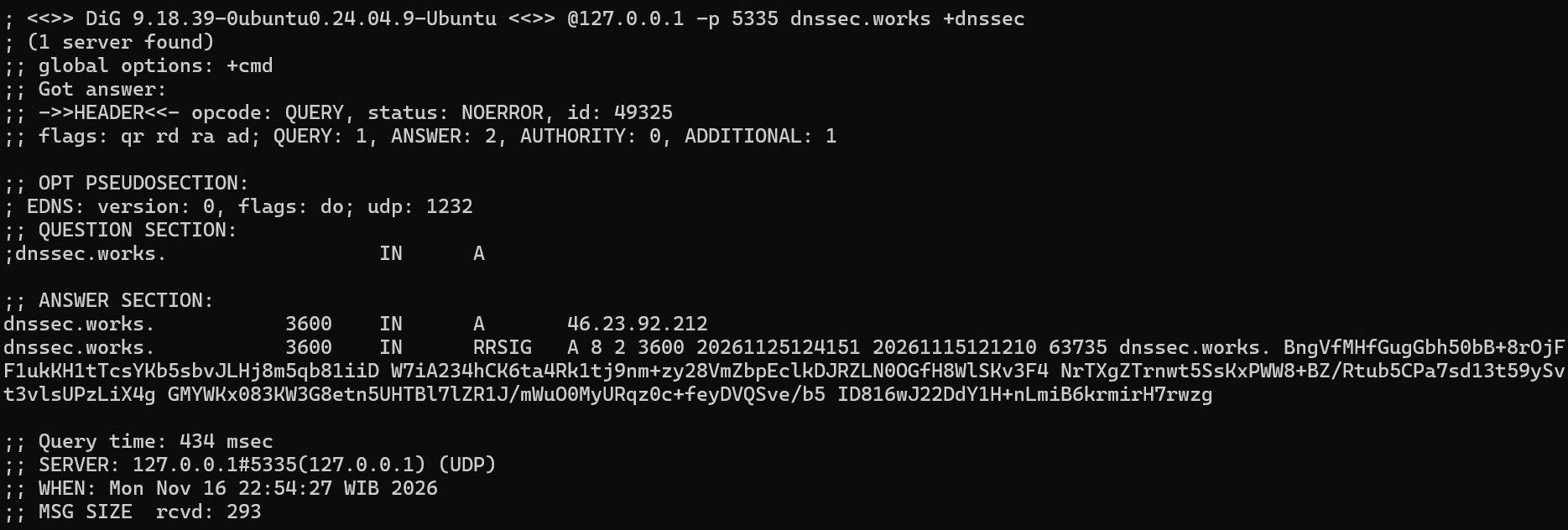
I tested a known DNSSEC-valid domain:
dig @127.0.0.1 -p 5335 dnssec.works +dnssecThe response included:
status: NOERROR
flags: qr rd ra ad
This confirmed successful validation for that response.
I also tested a deliberately DNSSEC-broken domain:
dig @127.0.0.1 -p 5335 dnssec-failed.orgThe final response was:
status: SERVFAILThat is the expected behavior when DNSSEC validation fails.
The distinction is important:
NOERRORwithad: authenticated DNS data.SERVFAILfor the deliberately broken test domain: invalid DNSSEC data was rejected.
These tests provide evidence that Unbound's DNSSEC validation was operating as intended.
10. Final Integration Test
The final test was performed through Pi-hole rather than querying Unbound directly.
dig @127.0.0.1 google.comThe response:
status: NOERROR

ANSWER SECTION:
google.com. 253 IN A 172.253.144.102
google.com. 253 IN A 172.253.144.100
...
The query completed in approximately 1 millisecond.
The configured upstream was also checked once more:
pihole-FTL --config dns.upstreamsOutput:
[ 127.0.0.1#5335 ]This confirmed that Pi-hole was configured to use Unbound.
The implementation had reached its intended operating state:
- Pi-hole was responding on port 53.
- Unbound was responding on port 5335.
- Pi-hole used Unbound as its upstream.
- Recursive DNS resolution worked.
- DNSSEC validation was demonstrated successfully.
11. Pi-hole Gravity and Domain Filtering
The recursive resolver was only one part of the project.
Pi-hole also maintained its Gravity database using several blocklist sources, including:
- StevenBlack Hosts
- HaGeZi Pro
- OISD Big
- AdGuard Hostlists
- Adam4wan Indonesian gambling blocklist
- YouTube Ads blocklist
An earlier Gravity update revealed that two GitHub sources were incorrectly configured with blob URLs.
The retrieval process was downloading GitHub HTML instead of the intended text files.
I corrected them to use raw.githubusercontent.com.
For example:
https://raw.githubusercontent.com/adam4wan/Adlist-Pihole-Indonesia/main/blocklistJudiPiHoleIndonesia_byAdam4wan.txtAnd:
https://raw.githubusercontent.com/kboghdady/youTube_ads_4_pi-hole/master/youtubelist.txtAfter correcting the URLs, Pi-hole parsed the sources successfully.
The resulting Gravity database reported:
Number of gravity domains: 764809
585139 unique domains
This demonstrated that the lists were being parsed, although domain counts alone are not a measure of filtering quality.
12. Verifying DNS Filtering
I performed another test using three domains:
dig @127.0.0.1 google.com
dig @127.0.0.1 youtube.com
dig @127.0.0.1 doubleclick.net
The results were:
| Domain | Result |
|---|---|
| google.com | Resolved successfully |
| youtube.com | Resolved successfully |
| doubleclick.net | Blocked |
The strongest evidence came from the doubleclick.net response:
EDE: 15 (Blocked): (gravity)

doubleclick.net. 2 IN A 0.0.0.0
This confirmed that Pi-hole Gravity was actively blocking the tested advertising domain.
It is worth noting that blocking YouTube's advertising infrastructure is more complicated than blocking a single domain. A dedicated list does not guarantee that every YouTube advertisement will be removed.
13. Security Considerations
Self-hosted DNS offers more control, but it also creates operational responsibilities.
A few security considerations are particularly relevant to this deployment.
Keep Unbound private.
Unbound listens only on:
127.0.0.1:5335There is no need to expose it publicly.
Review Pi-hole's network exposure.
Pi-hole was observed listening on:
0.0.0.0:53
[::]:53
This means the service is bound to all local IPv4 and IPv6 interfaces.
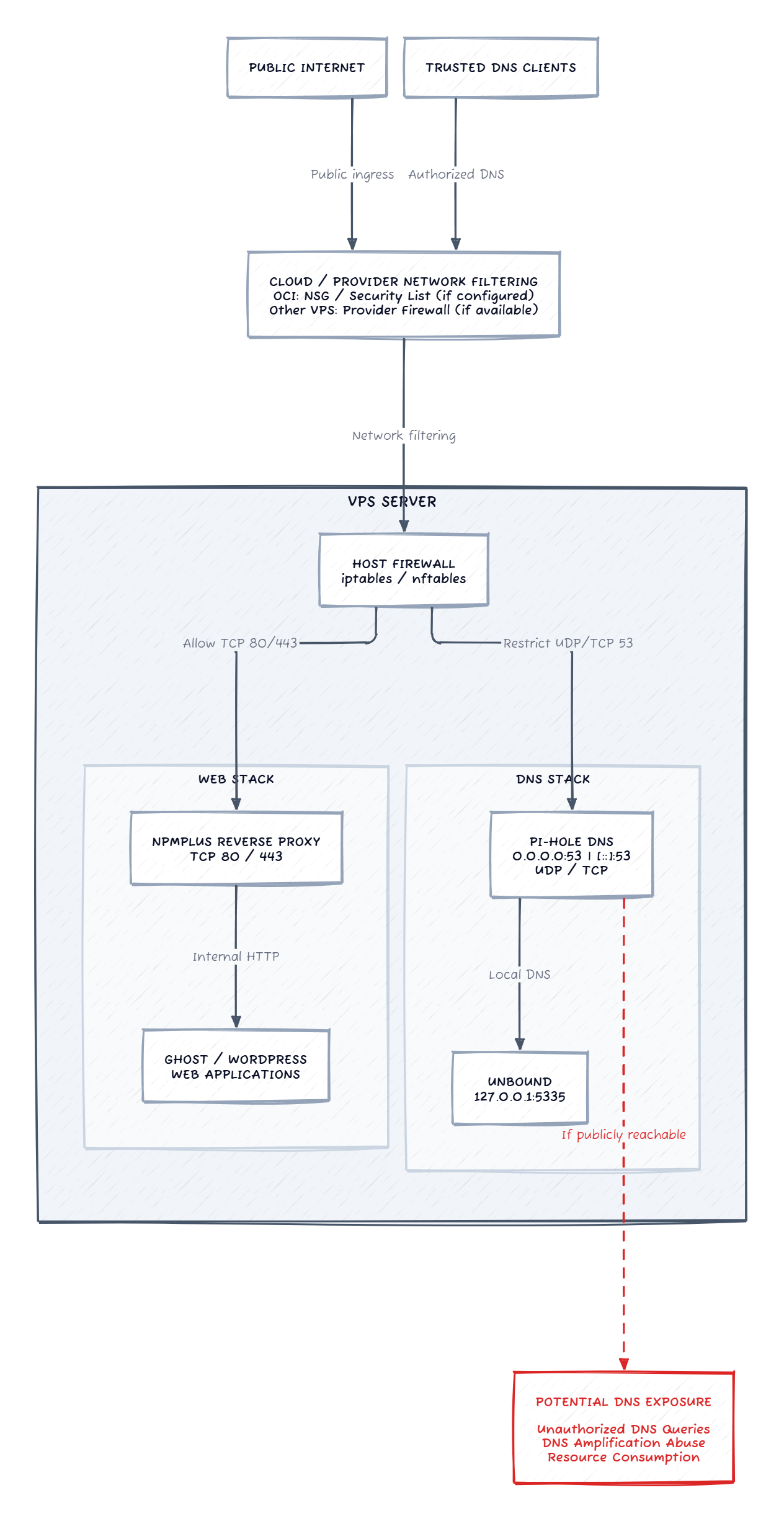
Access should be restricted to intended client networks using firewall rules and OCI security controls. An unrestricted public DNS resolver can be abused for DNS amplification and other unwanted activity.
Maintain DNSSEC validation.
DNSSEC validation should remain enabled and periodically tested.
Monitor service health.
Useful commands include:
systemctl status unbound
systemctl status pihole-FTL
And:
journalctl -u unbound -n 50 --no-pager
journalctl -u pihole-FTL -n 50 --no-pager
Back up the configuration.
The important configuration files include:
/etc/unbound/unbound.conf.d/pi-hole.conf
/etc/pihole/pihole.toml
The Gravity database and Pi-hole configuration should also be backed up regularly.
14. Lessons Learned
There were several practical lessons from this implementation.
1. Recursive DNS requires direct network connectivity.
A recursive resolver needs to communicate with external DNS infrastructure. Outbound UDP and TCP port 53 must work.
2. Service status and DNS availability are different things.
Unbound can be active while Pi-hole is unavailable. Each component must be tested independently and then together.
3. Pi-hole v6 configuration differs from older CLI examples.
The upstream configuration was applied using:
pihole-FTL --config dns.upstreamsrather than older Pi-hole command examples.
4. DNSSEC needs positive and negative testing.
A successful query alone does not establish that DNSSEC validation is functioning. Testing both valid and deliberately invalid DNSSEC domains provides stronger evidence.
5. Blocklist sources must be verified.
A retrieval success message does not necessarily mean the content is a valid domain list. GitHub raw URLs should be used when retrieving raw text files.
6. Monitoring remains important.
A working DNS architecture can still experience service restart problems, network restrictions, or configuration drift.
Conclusion
This project transformed a conventional Pi-hole deployment into a self-hosted recursive DNS infrastructure.
By combining Pi-hole v6 with Unbound, the system now separates DNS filtering from recursive resolution.
Pi-hole handles Gravity and DNS policy. Unbound performs recursive DNS resolution and validates DNSSEC data.
The implementation was completed on an Ubuntu 24.04 ARM64 VPS hosted in Oracle Cloud Infrastructure in Indonesia.
The final tests demonstrated successful DNS resolution through Pi-hole, direct recursive resolution through Unbound, DNSSEC validation, and Gravity-based blocking.
For me, this project was not simply about blocking advertisements. It was about understanding and operating a fundamental internet service from the infrastructure layer upward.
A small DNS server can become a useful learning environment for Linux administration, network engineering, DNS security, and infrastructure automation.
The goal was not just to use DNS. It was to understand, control, and operate it.